On a computer
在电脑上
Mobile phone or tablet
手机或平板
  1. Open a browser
    打开浏览器
  2. Enter the web address of this site 输入下面的网址
    moodle.migrantshope.org
  1. Download and install the Moodle app
    下载安装Moodle app
  2. Open the Moodle app and enter the web address
    打开Moodle app输入下面的网址 moodle.migrantshope.org
First Time using Moodle
第一次使用
After first time
第一次以后
Log in with your username and password given by your teacher,
Moodle will ask you to set up your own password
输入老师给你的用户名和密码登录,平台会马上要求你设定你自己的密码
Log in with your username and your own password
输入你的用户名和你自己的密码登录
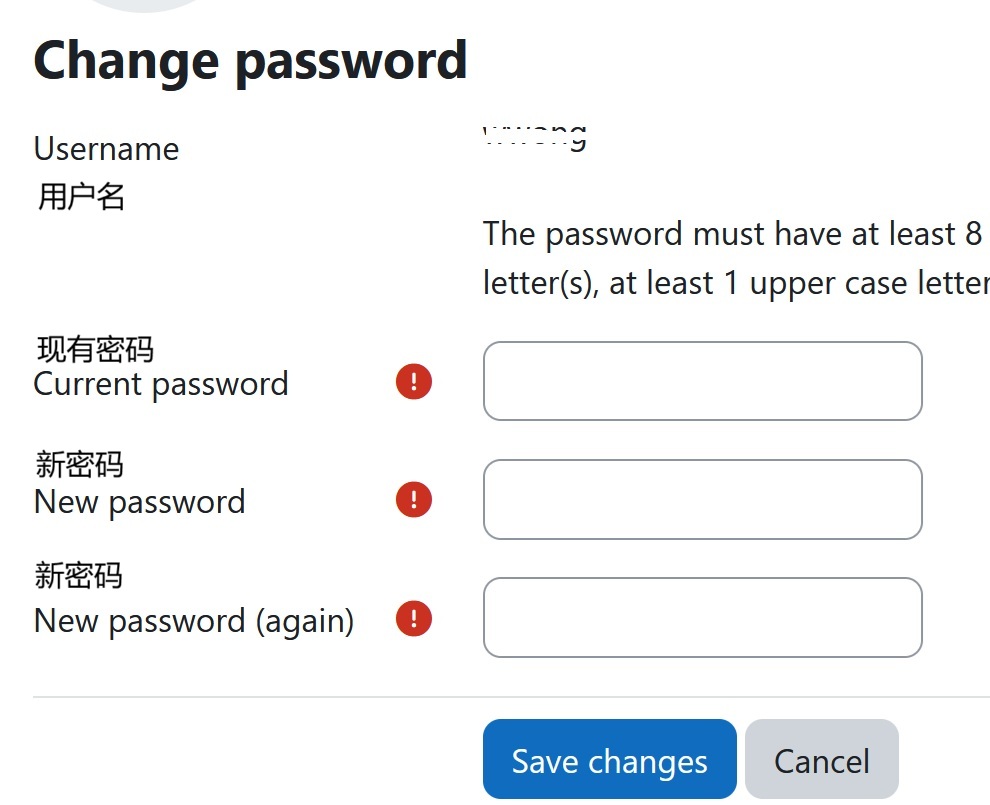
Set up/ Change password
设定密码
change passwor
  1. Enter your current password in the first box
  2. Enter a new password in the second and third boxes
  1. 在第一个空格输入现有密码
  2. 在第二和第三个空格输入新密码

The password must have:

  1. at least 8 characters,
  2. at least 1 digit(s),
  3. at least 1 lower case letter(s),
  4. at least 1 upper case letter(s),
  5. at least 1 special character(s) such as *, -, or #

密码必须符合下面的要求:

  1. 要有8个字符以上
  2. 至少有一个数字
  3. 至少有一个小写字母
  4. 至少有一个大写字母
  5. 至少有一个特别符号,例如-*#等

Last modified: Friday, 24 January 2025, 11:43 AM